

How to Recover From a Google Algorithm Update
If you want to recover from a Google algorithm update, the first thing to do is work out what’s actually happened. Check which pages and searches have lost visibility, rule out technical problems, then decide what needs improving. There’s no single fix that works for every website, and changing things in a panic can leave you with more problems than you started with.
Watching your rankings drop isn’t much fun. You want to know what’s happened, what it means for your business and what needs doing.
That’s where we start with our clients.
We look at the data, explain what we’re seeing and work out the next steps together. Before making changes, we need to understand what we’re dealing with.
1. Has a Google algorithm update affected your website?
Your traffic dropped around the same time as a Google update. That’s worth looking into, but it doesn’t automatically mean the update caused it.
Check Google’s confirmed update dates
Start with the Google Search Status Dashboard. It tells you when a confirmed update started, whether it’s finished and what Google has said about it.
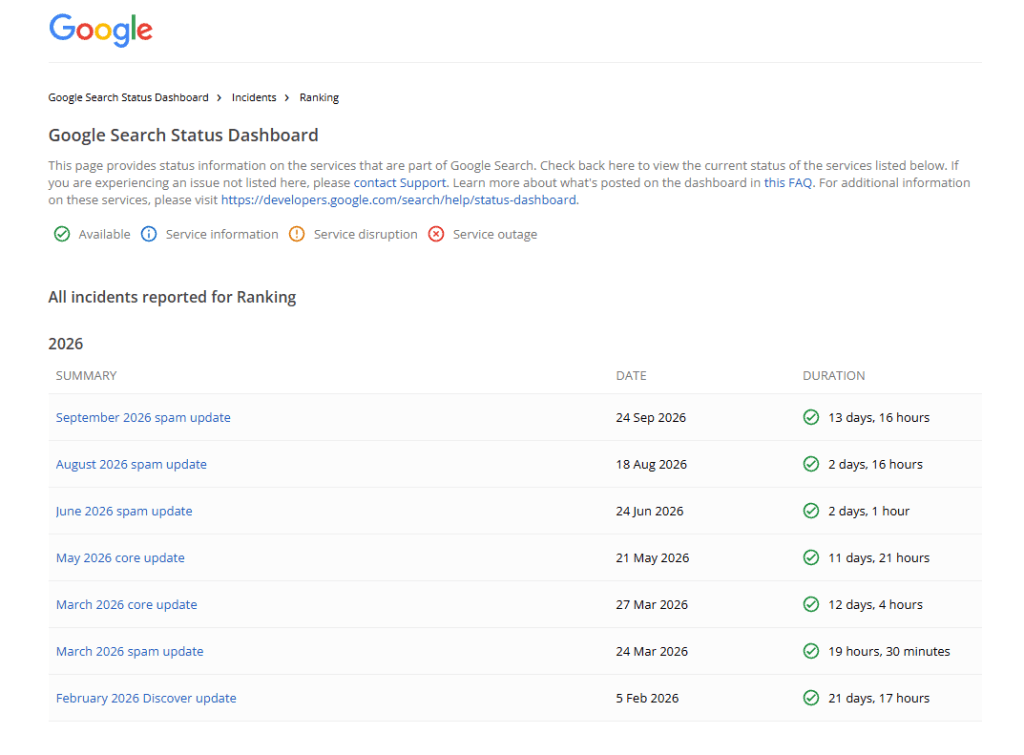
Google’s Search Status Dashboard lists confirmed updates and their rollout dates. Check these before comparing changes in your website’s search performance.
Core updates are broad changes to how Google ranks results.
Spam updates improve the systems Google uses to spot practices that break its spam policies.
They aren’t the same thing, so it helps to know which one you’re looking at.
Rankings can go up and down while an update rolls out. A drop at the start might look worrying, but it’s too soon to know where things will settle. We keep track of what’s changing and which pages and searches are affected before deciding what to do next.
One bad day isn’t a reason to start changing everything.
Keep monitoring your website during the rollout. Google recommends waiting at least a week after a core update finishes before comparing the results. But if you spot a clear technical problem, fix it—you don’t need to wait for the update to finish.
Rule out other reasons for the drop
What else changed around that time?
- Did someone update the website?
- Change the cookie settings?
- Move a few pages?
- Is this normally a quieter time of year?
These are the sorts of questions to ask before blaming the algorithm.
| What you’re seeing | What to check |
|---|---|
| GA4 traffic has dropped, but GSC clicks haven’t | Tracking, cookie consent and reporting changes |
| Certain pages have lost impressions and rankings | Competition, content relevance, indexing and technical changes |
| Clicks have fallen, but impressions and rankings look similar | Click-through rate, your search listing and changes to the results page |
| Important pages have disappeared from search | Indexing settings, server problems, security issues or manual actions |
| Clicks look steady, but enquiries have fallen | Tracking, forms, offers and what happens after someone lands on the website |
Also check Google’s Search Console Data Anomalies page. Sometimes the problem is with the reporting, rather than your website.
Read the dates and reports mentioned carefully. A logging problem affecting Discover won’t necessarily explain a drop in ordinary Web search.
Is a Google update the same as a Google penalty?
No. Losing rankings after a core update doesn’t automatically mean you’ve done something wrong.
Google may have changed how it assesses the results and decided that other pages are a better fit. That’s different from a manual action, where a human reviewer has found a breach of Google’s spam policies.
| Situation | What’s happened | What to do |
|---|---|---|
| Core-update ranking changes | Google may now see other results as more useful or relevant | Look at the affected searches and compare your pages with the results now appearing |
| Manual action | A Google reviewer has identified a spam-policy violation | Fix the reported issue and follow the review process |
| Technical problem | Google is struggling to crawl, index or show your pages | Find and fix the fault |
You might remember older names such as Panda and Penguin. Panda focused on content quality, while Penguin tackled link spam. Both later became part of Google’s core ranking systems.
They’re useful background, but knowing the name of an old update won’t tell you what’s wrong with your website today.
How to check for a Google penalty
Open the Manual Actions report in Google Search Console. If Google has issued a manual action, you’ll find information about it there.
Check Security Issues too, which covers problems such as hacking and malware.
If the Manual Actions report is clear, that means there’s no reported manual action. It doesn’t explain every possible reason for a ranking drop. Google’s manual-action guidance explains what to look for and how the review process works.
2. Identify which pages and searches have lost visibility
“Traffic’s down” is a starting point. Now we need to find out where it’s down and whether those lost visits were important to the business.
Compare the right dates in Google Search Console
Compare a suitable period before the rollout with a settled period afterwards. Use the same number of days, ideally with the same mix of weekdays.
A 28-day comparison is often useful. Comparing your best week of the year with a bank-holiday week probably isn’t.
If your business is seasonal, look at the same period last year as well.
Check these four figures together:
- Clicks: clicks on links to your website in Google search results.
- Impressions: how often your website appeared in those results.
- CTR: the percentage of impressions that led to a click.
- Average position: the average highest position recorded for the page or website you’re looking at.
Here’s a practical way to start your Google algorithm update audit:

Comparing before-and-after performance in Search Console shows which pages and searches were affected, so you can focus on the changes that matter most.
- Open the Search results Performance report and choose the relevant search type, usually Web.
- Open the date filter, select Compare and enter your before-and-after dates.
- Turn on clicks and impressions, then open the Pages tab.
- Sort by the clicks difference to find the pages losing the most clicks. Check the numbers as well as the percentages—a page going from two clicks to one isn’t your biggest problem.
- Select a losing page, then open Queries to see which searches have changed.
- Look at impressions, CTR and position for those searches. Add country or device filters where they help narrow things down.
Look for patterns across pages and queries
We like to work our way through the figures in this order:
Whole website → section or topic → landing page → query
Has everything dropped, or just one service? Are product categories struggling while blog posts are doing fine? Has the change happened on mobile but not desktop?
Separate branded searches from searches made by people who don’t already know you. More people searching for your company name can hide a drop elsewhere.
Bear in mind that Google withholds some queries for privacy. Your query table won’t contain every search behind the headline figures.
Average position needs a bit of care too. It can improve because lower-ranking searches have disappeared, even while overall visibility falls. Look at the same searches over time rather than relying on one average.
If rankings look steady but impressions have fallen, check demand. Google Trends shows relative search interest, rather than exact search volumes. It can help you see whether fewer people are searching for the subject generally.
Check the business impact in GA4
Next, look at organic landing-page sessions and the actions that matter: enquiries, bookings, purchases or other configured key events.
Which pages lost visitors? Were those visitors making enquiries or buying anything?
Search Console clicks and GA4 sessions measure different things. Cookie consent, tracking and attribution can also affect the figures, so don’t expect them to match exactly.
If clicks are steady but enquiries have fallen, try the enquiry process yourself. Does the form work? Does the confirmation page load? Is the enquiry being recorded?
Then look at the offer and the journey through the website. Getting someone onto a page is only part of the job.
Bounce rate might point you towards something worth checking. It doesn’t prove that Google spotted a problem and lowered your rankings.
An update doesn’t have to mean a setback
We saw this with a client in the bottled gas supply industry that we’ve been supporting with ongoing SEO.
Comparing the 28 days before Google’s May 2026 core update with a 28-day period starting eight days after the rollout finished:
- Google clicks increased from 361 to 414—up 15%.
- Impressions increased from 37,227 to 56,588—up 52%.
- Clicks from disclosed searches excluding the client’s main brand terms increased from 58 to 82—up 41%.

Our bottled gas supply client recorded 15% more clicks and 52% more impressions during 10 June–7 July than 23 April–20 May 2026. This shows improved performance after the May core update rollout, without establishing what caused the increase.
That’s encouraging when you’ve been putting consistent work into a website. It shows that an update announcement isn’t automatically bad news, and that improvements weren’t limited to people searching for the business by name.

Search performance for a bottled gas supply client we support with ongoing SEO. The shaded area marks the May 2026 core update rollout.
We wouldn’t put the increase down to the update alone. Seasonal demand and other changes can affect the figures too. What we can say is that this client attracted more search clicks and appeared more often in the results during the comparison period.
Source: Google Search Console, Web search. Comparison: 23 April–20 May versus 10 June–7 July 2026. The May core update rolled out from 21 May to 2 June. The later comparison period also includes the June spam update.
3. Check technical changes before rewriting your content
Before you rewrite a page, make sure people and search engines can actually get to it.
Check:
- Noindex directives: has an important page accidentally been told to stay out of search?
- Robots.txt: are restrictions stopping Google from crawling something it needs?
- Canonical URLs: are you pointing Google towards the right preferred version of a page?
- Server errors: are pages failing to load, even if only occasionally?
- Redirects: do old URLs take people straight to the right replacement?
- Migrations: have URLs, domains, templates or navigation changed?
- XML sitemaps: are important canonical, indexable URLs included, and can Google read the sitemap?
- Content and navigation: can Google access the important text and links?
- Recent releases: did a website or plugin update happen around the same time?
Use Search Console’s Page indexing report and URL Inspection to investigate individual pages. The indexed information can come from an earlier crawl, so check what’s happening on the live page too.
A sitemap helps Google discover URLs. It doesn’t guarantee they’ll be indexed.
The Crawl Stats report is also worth checking for changes in server responses, response times and failed requests. A change in crawl volume alone doesn’t mean you’ve been penalised.
A crawler such as Screaming Frog can help spot problems across a larger website. Start with the pages that matter rather than trying to fix every warning at once.
Also review your internal linking. Can visitors reach important pages through sensible routes? Crawl depth shows how many clicks it takes to get to them and can help uncover pages buried away from the rest of the site.

Loading and usability matter too. Our Core Web Vitals guide explains those measures. Just don’t assume a better speed score will fix every ranking drop.
4. Review what has changed in the search results
Take a step back and look at who’s new, who’s disappeared and who’s stayed where they were.

Has the search intent changed?
Search intent is what someone is looking for when they type a query into Google. Do they want advice, a product to buy or a business to contact?
Look at the pages Google is showing. If most are product categories, a general advice article might not be what people need. If the results are full of detailed guides, a short sales page probably won’t give them enough information.
We saw this with a nationwide client that had separate pages for different locations. After suspected algorithm changes, we checked the results and noticed local businesses and national providers moving into more prominent positions for some location searches.
How closely a business was connected to the area seemed to play a part. That didn’t mean Google had ruled out businesses based elsewhere—it was simply a pattern we noticed in those results.
Checking what had changed gave us something useful to work with, rather than guessing why the pages had dropped.
What do competing pages help readers do better?
It’s easy to look at a competitor and think, “Ours is better.” We need to put that aside and look properly.
Are they answering something you’ve missed? Showing useful examples? Explaining who the service is suitable for? Making it easier to buy?
Copying their headings or adding another thousand words won’t necessarily help. Find out what makes their page useful and where yours leaves people guessing.
Have search features changed?
Search engine results pages—SERPs—contain much more than ordinary website listings.
AI Overviews, maps, shopping results, videos and featured snippets can all change what someone sees before reaching your website. Your position might look similar while fewer people click.
Check what’s appearing around your listing before deciding the page itself has got worse.
5. Improve the content on affected pages
If the evidence points towards content, it’s time for an honest look at it. Someone who doesn’t work on the website every day can be useful here.

Match the page to the searcher’s needs
What’s the page meant to help someone do?
If they search “how to bake a chocolate cake”, they probably want a recipe. A bakery’s order page answers a different question, however good the sales copy is.
Apply that thinking to your own pages. Does a service page explain who it’s for, what’s involved and how to enquire? Does a guide give someone enough information to do the job?
Add useful evidence and first-hand expertise
Original content means more than taking a competitor’s article and changing the words.
Show what you know. Use real examples, explain practical details and back up important claims. Make it clear who wrote specialist advice and why they’re qualified to give it.
E-E-A-T stands for experience, expertise, authoritativeness and trustworthiness. It’s useful when reviewing content quality, but it isn’t a score you can improve by repeatedly calling yourself an expert.
Using AI doesn’t automatically make content unsuitable either. The finished work still needs to be accurate, useful and worth reading. Churning out pages that add nothing useful is a different matter.
We also prefer writing individual meta descriptions rather than leaving every description to chance. They help us explain the page clearly, although Google may show different wording and meta descriptions don’t directly improve rankings.
Decide whether to update, combine or remove content
You don’t have to make the same decision for every page:
- Update useful pages with missing details or outdated advice.
- Combine pages doing much the same job, keeping the information worth saving.
- Remove content with no useful purpose when improving it doesn’t make sense.
Low traffic alone isn’t a good reason to delete something. A specialist page might help a small number of people make an important buying decision.
If you combine pages and change URLs, plan suitable redirects and update the internal links.
What if the decline followed a helpful content update?
People searching for helpful content update recovery are often looking into older losses. During the March 2024 core update, Google incorporated its former helpful content system into its core ranking systems.
There isn’t a separate recovery button or submission process for it now.
Look at whether your content gives people something useful: reliable answers, real evidence and enough detail to meet their needs. Check for patterns across the website rather than trying to fix everything by changing one paragraph.
6. Review backlinks where the evidence warrants it
Backlinks are worth investigating when there’s a reason, such as losing relevant editorial links or finding a history of manipulative link building.
Look at where links come from and why they’re there. Our guide explains how to assess the quality of your backlinks.

You don’t necessarily need more backlinks than everyone else to rank well. And if an SEO tool flags a link as “toxic”, that doesn’t mean Google has penalised your website.
For most websites, there’s no need to use Google’s disavow tool, which asks Google to ignore certain links. It’s intended for cases where a substantial number of spammy or artificial links have led to a manual action, or are likely to. Read Google’s disavow guidance before taking that step.
If you’ve received a manual action, you can ask Google to review your website once you’ve fixed the issues. That’s called a reconsideration request. It isn’t an option for a normal ranking drop after a core update.
7. Prioritise improvements and track the results
You’ve done the checks and now you’ve got a list. What comes first?
Fix clear technical faults affecting important pages. Then focus on the services, categories and resources that help generate enquiries or sales.
Give each task a problem to solve and a result to check. “Improve SEO” doesn’t give anyone much to work with. “Remove the accidental noindex from this service page and monitor its indexing and search clicks” does.
If you need help making sense of the findings, our SEO team can review them and help decide where to start.
Keep a record of what changed and when. If you change everything at once, it becomes much harder to tell what made a difference.
Monitor the affected pages and searches alongside actual enquiries. If something doesn’t help, go back to the explanation rather than doing more of it and hoping for the best.
How long does it take to recover from a Google update?
There’s no fixed recovery time. Fixing a technical problem might show a result sooner than improving content across a whole website.
Google says some improvements can take effect in days, while others can take months to be recognised. You don’t always have to wait for another major core update, but you can’t assume your old rankings will return either.
Recovery can be uneven. One section might improve while another stays weaker. You might start attracting different searches from the ones you had before.
So yes, patience matters. But “be patient” is only useful advice when you’ve also got a plan: make justified improvements, give them time and check whether they’re helping.
Keep asking whether the website is reaching the right people and helping them take the next step.
Frequently asked questions
Can my website recover from a Google core update?
Yes, it can. How much it recovers and how long it takes will depend on the situation. Find out which pages and searches have been affected, improve what needs attention and monitor the results. Previous rankings aren’t guaranteed.
Does a ranking drop mean Google has penalised my website?
No. Competition, demand, technical problems and changes to Google’s ranking systems can all affect positions. Check the Manual Actions report for a reported manual action, then investigate the other possibilities.
Should I delete content after an algorithm update?
Don’t start deleting pages just because rankings have dropped. Check whether they’re useful, whether they overlap other pages and whether they could be improved. Removing the wrong content can create more work.
Should I disavow backlinks after losing rankings?
Not just because rankings have fallen. Most websites don’t need to use the tool. Look for specific evidence of unnatural links and follow Google’s guidance before taking action.
Should I keep publishing new content while working on recovery?
Yes, if there’s a clear reason for it and you can add something useful. Publishing more for the sake of it won’t fix the underlying problem. Your existing pages might need the attention first.
Need help understanding a drop in search visibility?
Seen your rankings or traffic drop and not sure where to start?
Talk To Media can look at your search performance, content and technical setup to help work out what’s changed and what to do next.
Get in touch with our team to talk it through.
